
There is a point in learning full stack development where reading about it stops being enough. You need to build something and watch the pieces connect. This guide walks through what a simple full stack project looks like, what each layer does, and how a beginner can approach building one without getting overwhelmed.
The goal here is not to produce production-ready code. The goal is to give you a clear picture of how a front end, a back end, and a database work together so that when you start writing your own code, you know what you are building toward.
What the project does
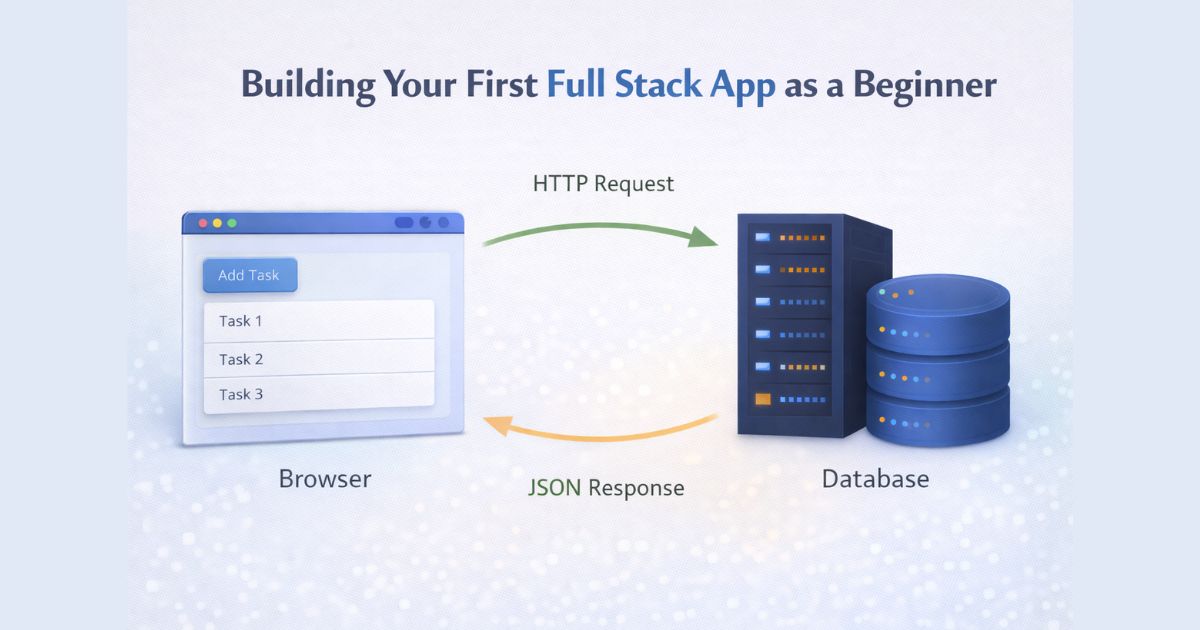
The project is a simple task list application. A user can add tasks, see existing tasks, and remove them. It is small enough to understand completely and covers the core mechanics of a full stack application: a front end that displays data and captures user input, a back end that handles requests and applies logic, and a database that stores information between sessions.
Building something like this teaches you more about full stack development than any amount of reading, because you encounter the actual problems: how to send data from the browser to the server, how to structure an API response, how to read from and write to a database, and how to connect all three layers so they work together reliably.
The front end layer
The front end for a project like this can be built with plain HTML, CSS, and JavaScript. You do not need React for a beginner project. A simple HTML file with a form for adding tasks, a list element for displaying them, and a few lines of JavaScript to handle the interactions is enough.
The JavaScript on the front end makes fetch requests to your server. When the page loads, it fetches the current list of tasks from the back end and renders them. When a user submits the form, it sends a POST request to the server with the new task. When a user removes a task, it sends a DELETE request. The front end does not store data itself. It asks the server for data and tells the server when something has changed.
This is the front end pattern that repeats across almost every web application. If you want to strengthen your understanding of how JavaScript handles these interactions before building your own project, the article on JavaScript basics and the DOM covers the foundations you need.
The back end layer
The back end is a Node.js server using Express. It defines three routes: one that returns all tasks, one that adds a new task, and one that deletes a task by its ID. Each route receives a request from the front end, does the appropriate work, and sends a response back.
The server is also where you put logic that should not live in the browser. Validation, authentication, and business rules all belong on the server. For a beginner project, this might be as simple as checking that a task is not empty before saving it, but the pattern is the same regardless of how complex the application gets. As your applications grow and need to connect data across multiple systems or provide governed access to different data sources, you may want to explore platforms like DreamFactory, which provides secure, governed API access to any data source with role-based controls.
Understanding how Node.js handles requests and how Express structures routes is covered in more depth in the article on how Node.js lets JavaScript run on the server. If any of the back-end concepts here feel unclear, that article is worth reading first.
The database layer
The database stores the task data so it persists between sessions. If you close the browser and come back, your tasks are still there because they live in the database, not in memory on the server.
For a beginner project, SQLite is a practical choice because it runs as a single file and requires no separate installation or configuration. You create a table for tasks with an ID and a description, and your server reads from and writes to that table when it handles requests.
More complex applications use databases like PostgreSQL or MongoDB, but the concepts are the same. You write a query, the database returns a result, and the server sends it to the front end. The article on beginning SQL is a useful reference if you want to understand how queries work before adding a database to your project.
How the layers connect
The connection between layers happens through HTTP requests and JSON. The front end sends a request to a URL on the server, the server processes it and sends back JSON, and the front end reads that JSON and updates the page. That pattern is how almost every modern web application works, from a simple task list to a large-scale product.
When you build a project and watch that cycle happen in your own code, the architecture stops being abstract. You see exactly where data comes from, where it goes, and what each layer is responsible for. That understanding is what makes you ready to work on more complex applications and to collaborate with other developers who specialize in one part of the stack.
What to build next
Once you have a working task list app, the natural next steps are adding user authentication, deploying the application so others can access it, and building more complex data relationships. Each of those extends what you have already learned rather than starting over.If you want a structured path that takes you through these steps with real projects, mentor feedback, and career support built in, the Full Stack JavaScript Techdegree is designed exactly for this stage of learning. You can also browse the Treehouse Library or explore Tracks if you want to go deeper on specific topics before committing to a full program.