
For teachers and school curriculum leaders navigating a crowded field of coding platforms, this guide gives you a practical, five-step framework for making the right call.
Coding education has never been more important—or more overwhelming to navigate. In 2026, hundreds of platforms are competing for school budgets, each promising the fastest path to fluency in Python, JavaScript, web development, and beyond. The result? A lot of noise, and a real risk of investing in the wrong online coding course subscription for your students.
This guide cuts through it. Whether you’re a classroom teacher building a standalone elective, a department head designing a full computer science program for schools, or a curriculum director evaluating district-wide tools, the five-step framework below will help you evaluate any platform with confidence—and match your choice to what your students actually need.
Why the Wrong Subscription Wastes More Than Money
Before we get into the framework, it’s worth naming what’s actually at stake. A mismatched coding subscription doesn’t just drain your budget—it drains student motivation. When beginners hit content that’s too abstract, projects that feel pointless, or a platform that doesn’t fit how your class runs, they disengage fast. And re-engagement is hard.
The good news: most subscription failures are predictable and avoidable. They almost always come down to one of five factors—curriculum fit, project quality, community support, administrative ease, or total cost. Let’s walk through each one.
Step 1: Evaluate Curriculum Fit for Your Learners
The first question isn’t “Is this curriculum good?” It’s “Is this curriculum right for my students?”
Start by mapping your cohort:
- What’s their current baseline? True beginners, or students with some exposure?
- What’s your instructional goal—digital literacy, a specific language like Python, or a pathway toward a career credential?
- How much class time do you have, and is this supplemental or your core curriculum?
Once you know that, look for these signals in any coding curriculum for educators:
Scaffolded progression. Does the platform move students from concept to concept logically, or does it dump too much at once? Look for platforms that break topics into short lessons (under 10 minutes), reinforce with in-lesson practice, and build complexity gradually.
Language and topic coverage. If your curriculum calls for Python, make sure Python is a first-class citizen—not an afterthought. A platform that treats Python as one of twenty languages often means shallow, inconsistent coverage. Specialized platforms tend to go deeper where it matters.
Reading level and accessibility. Scan a few actual lessons. Is the writing clear? Does the platform use real-world analogies, or does it assume prior knowledge? Beginner programming courses should read like a conversation, not a textbook.
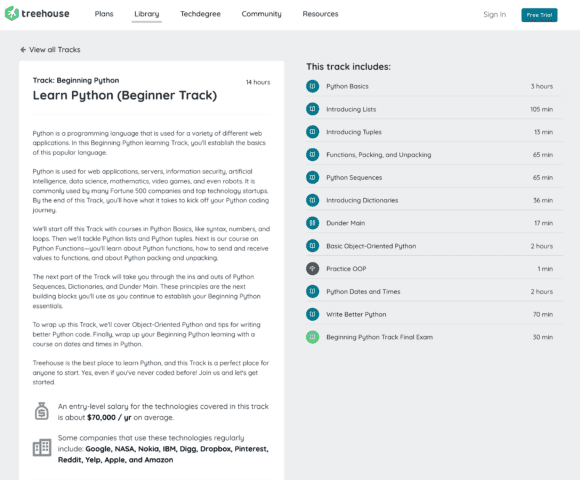
Treehouse’s approach: Every Treehouse course is structured around a clear learning path—from fundamentals through project-ready skill levels—so students always know what they’re learning and why. The curriculum is written for absolute beginners, which means teachers don’t have to pre-teach context before assigning lessons.
Step 2: Assess Project Quality and Real-World Application
This is where most platforms separate themselves. Theory without practice creates passive learners. If students finish a unit and can’t build something, the learning hasn’t stuck.
What to look for in project-based learning:
Projects that ship. The best project-based learning platforms have students producing real, working code—not just filling in blanks. Look for capstone projects, portfolio pieces, and challenges that require original thinking, not just copying.
Relevance to student interests. A student who wants to build a website is motivated differently than one who wants to automate a spreadsheet. Does the platform offer projects across multiple domains—web development, data analysis, apps, automation—so different students find something that resonates?
Difficulty calibration. Projects should stretch students without breaking them. Look for built-in hints, worked examples, and checkpoints that let students get unstuck without just giving them the answer.
Questions to ask any vendor:
- Can I see a sample project for the beginner level?
- Do students have any creative latitude, or are all outcomes the same?
- How are projects assessed—by automated tests, instructor review, or peer review?
Treehouse’s approach: Treehouse courses are built around hands-on projects from the very first lesson. Students build real things—websites, apps, APIs—and can share finished work in their portfolio. Techdegree programs include both guided projects and open-ended personal projects that demonstrate independent skill.
Step 3: Look Beyond Content—Community and Support Matter
A student who gets stuck and has nowhere to turn will quit. Community and support infrastructure is often the difference between students who complete a course and students who don’t.
What strong community support looks like:
Peer forums or discussion boards. Can students ask questions and get answers from other learners? Active communities signal that the platform is being used—and that help is available when instructors aren’t.
Instructor or TA access. Some platforms offer live Q&A, office hours, or async support from real instructors. For school programs especially, this is valuable when a student encounters a concept the classroom teacher isn’t fluent in yet.
Progress transparency. Can you, as the educator, see where students are getting stuck? Platforms with strong dashboards let you identify struggling students before they fall behind—which matters a lot in a classroom context.
Comparing coding course platforms on community often means going beyond marketing pages. Ask for references from other schools. Read reviews on G2 or educator forums. The platforms that invest in community are usually the ones that see higher completion rates.
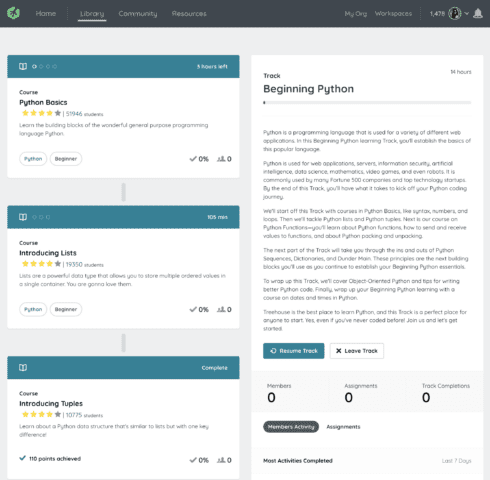
Treehouse’s approach: Treehouse includes community forums where students can post questions, share progress, and support each other. Educators using Teams accounts get access to group management tools that make it easier to track where students are and intervene early.
Step 4: Evaluate Administrative Fit for Your Classroom
Even the best curriculum fails if it creates friction for you as an educator. Administrative fit is underrated in most comparing coding course platforms frameworks—but it’s often the factor that determines whether a subscription gets used or abandoned mid-year.
Key admin questions:
How does enrollment work? Can you add students in bulk, or do they each need to create accounts individually? Does the platform support SSO (single sign-on) with your school’s existing identity system (Google Workspace, Clever, etc.)?
What does the teacher dashboard show you? At minimum, you want visibility into: who’s logged in, what they’ve completed, where they’re stuck, and whether they’re on pace.
How is the subscription licensed? Per-seat annual? Site license? Some platforms charge per active user, which can create surprises mid-year if you add students. Know the model before you sign.
Does it work with your existing LMS? If your school uses Canvas, Google Classroom, or Schoology, check whether the platform integrates—or at least makes it easy to share links and assignments from within your existing workflow.
What’s the onboarding support? For a teacher who isn’t a professional developer, setup should be simple. Look for guided walkthroughs, video tutorials, and a customer support team that responds quickly.
Treehouse’s approach: Treehouse Teams accounts are designed specifically for group learning contexts, with centralized billing, bulk seat management, and dashboard reporting that gives educators a clear view of their group’s progress—without requiring any technical expertise to set up.
Step 5: Calculate Total Cost of Ownership
Sticker price is rarely the full picture. When evaluating course library quality and overall value, factor in all of the following:
Seat count and pricing tiers. Most platforms discount at volume. Get quotes for your actual expected enrollment, not just the per-seat list price.
What’s included. Does the subscription include all courses, or are advanced tracks locked behind higher tiers? A low headline price can balloon quickly if your students need content that’s behind a paywall.
Renewal and cancellation terms. Annual contracts are standard, but know your terms. What happens if enrollment drops? Can you pause? Is there a grace period to add seats mid-year?
Hidden costs. Consider: time to onboard students, time to create assignments around the platform’s content, and any supplemental materials you’d need to buy. A platform that requires significant teacher prep may cost less on paper but more in practice.
Return on investment. For school decision-makers, ROI is about more than completion rates. Does the platform help you meet specific learning standards? Can you tie outcomes to a credential or certification students can use? Platforms that connect to real-world credentials (like Techdegree certificates) give students—and your program—something tangible to point to.
A simple comparison table: When evaluating multiple platforms side-by-side, score each one across these five dimensions (1–5 scale) and weight by your priorities. A platform that scores a 5 on curriculum fit but a 2 on admin tools may not be worth it if you’re managing 120 students across four sections.
A Practical Checklist Before You Commit
Use this before signing any online coding course subscription:
Curriculum
- [ ] Content matches my students’ current skill level
- [ ] Covers the languages/topics in my curriculum
- [ ] Lessons are self-paced and beginner-accessible
- [ ] Clear learning paths with measurable milestones
Projects
- [ ] Students build real, working projects (not just exercises)
- [ ] Projects are relevant to student interests
- [ ] Built-in support for getting unstuck (hints, examples, checkpoints)
Community & Support
- [ ] Active peer community or discussion forum
- [ ] Instructor or TA support available
- [ ] Educator dashboard with student progress visibility
Administration
- [ ] Bulk enrollment and SSO support
- [ ] LMS integration or easy link-sharing
- [ ] Simple setup with clear onboarding documentation
Cost
- [ ] Volume pricing available
- [ ] All relevant content included in base tier
- [ ] Clear renewal and cancellation terms
- [ ] Credentials or certificates students can share
Ready to See How Treehouse Stacks Up?
Treehouse was built for exactly this use case: structured, beginner-friendly coding education that works for individual learners and organized groups. With Treehouse Teams, educators get:
- Curated learning paths in Python, JavaScript, web development, data analysis, and more
- Hands-on, project-based courses designed for beginners
- A group dashboard to track progress and identify struggling students
- Flexible billing with volume pricing for classrooms and schools
- Industry-recognized Techdegree programs that lead to real credentials
Explore Treehouse for Educators →
Browse the Full Course Library →
Start a Free Trial →
Have questions about which Treehouse plan is right for your school or classroom? Contact our team — we’re happy to walk you through options and pricing for your specific setup.