

Kari Brooks is not a professional developer, she’s the CEO of Treehouse. Using AI, she was able to turn a personal side project into a real digital product — and you can, too, with Treehouse’s AI Bootcamp, free to all Treehouse subscribers.
Before the app, there was the day job
For Kari Brooks, AI is infrastructure rather than an occasional tool. “It’s baked into my daily Treehouse work now,” she says. “For me, the real value is what it saves me on the small things every day that used to chip away at my time.”
At Treehouse, she uses Lovable to create new site pages, Claude to build analytics dashboards, Synthesia for learning content, and ChatGPT for communications tasks. None of it is glamorous work. It’s the daily operational load that comes with running a lean company, and it’s exactly where Kari has found AI most valuable.
That fluency didn’t stay contained to the day job. It changed what she thought she could create on her own time, too.
From concept to digital product
For several years, Kari had been creating oracle cards as a hobby. Similar to tarot or angel cards, oracle cards use imagery and symbolism as a means for personal insight.
“Someone gave me a deck years ago when I was in college, and it just stuck,” she says. “I draw a card every morning to set a focus for my day. They’re part self-reflection, part Magic 8 Ball,” she jokes.
She had pictured eventually working with a manufacturer to create a printed deck. Somewhere in the very distant future, that is. Spare time is a luxury when you’re a mom and a CEO, and physical products are complicated. Printing, inventory, distribution—the path from illustrations to an actual product was daunting. So the cards sat, mostly finished, with nowhere to go.
How AI changed the way she thinks about building
Kari didn’t start using AI because she was looking for a side project. She started using it because she was running a company and needed a better way to keep up with the work. “I needed a faster path to done,” she says. In the years since she joined Treehouse, AI has changed her sense of what’s possible. Instead of assuming a project required a developer, a designer, or an outside agency before it could begin, she started asking a different question: What can I make progress on myself?
Applied to the oracle cards, that question shifted from “how will I ever get this printed and distributed?” to “what can I do with what I have now?”
That reframe was enough to turn a stalled project into a real product: the Aurum Symbols Deck.
“I had a free Saturday, and it was a typical rainy winter day in Portland. So I pulled up that old oracle card idea and just started,” she says. “Not to finish it, but just to see what would happen.” The card designs were mostly there; what she started that weekend was turning them into something people could actually use.
The app she built without coding
The Aurum Symbols Deck is a digital suite of 396 cards organized into 11 themed collections. Available on desktop, tablet, and phone, it lets users draw a single card for daily reflection or use a three-card spread to explore a question in greater depth. The collection spans themes including sacred geometry, alchemy, elemental forces, mythology, animals, and botany.
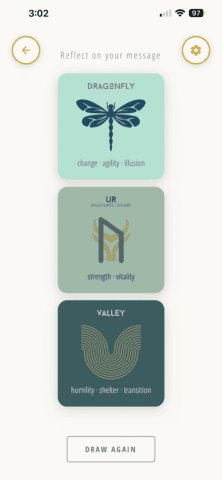
The product is a Progressive Web App (PWA), meaning it looks, feels, and behaves like a native app, but lives in your browser. No download required. It works across every device, built on standard web technologies that AI helped Kari write from scratch.
“I built the whole thing with Claude Code, including a payment piece that’s hooked up to Stripe,” she says. “I was nervous about that part, but it was surprisingly easy.” That doesn’t mean the work was effortless, but the technical barrier was lower than it would have been even a few years ago.
The most important skill was description
Before building anything, Kari spent time describing what she wanted. Not in code. In words.
She wrote out how the site should feel, how people should move through the interface, how card animation should work, and how the purchase flow should function.
That became the raw material for her prompts. “The quality of what you describe directly determines the quality of what gets built,” she says — a principal taught in The 5 Principles of Effective AI Prompting, Day 3 of the AI Bootcamp program.
This is one of the most important lessons for anyone learning to build with AI. The tools can generate code, designs, drafts, and workflows. But they still need human direction. They need a clear description of what “good” looks like and what “done” means.
That requires product judgment: knowing when an output is close, when it’s wrong, and how to explain what needs to change. Kari had spent years building exactly that muscle as a product owner on a software team. Building with AI felt like a natural extension of it. “AI filled the technical gaps,” she says. “My experience filled in everything else.”
The hardest part was not the tech
Kari expected payments to be the hardest part. The rest of the technical build was unfamiliar as well: hosting, domains, SSL certificates, even figuring out what a PWA was. But AI helped break those problems into steps. “It wasn’t perfect the first time. Or the second time. But each problem became manageable once I could describe what was wrong and how I wanted it to look or work.”
The technical pieces came together faster than she expected. The harder part turned out to be organizing and finalizing the content, which took several months of weekend work. Every card required its own imagery, title, symbolic meanings, design direction, and interpretive notes. With nearly 400 distinct cards, this was where the most intensive human creative work took place.
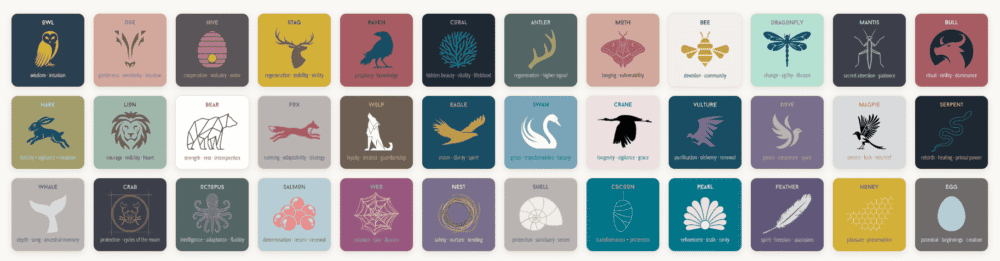
Kari used AI to organize and categorize years of illustrations, explore design directions, research symbolic meanings, and draft the cards’ interpretive notes. But every card still passed through her hands dozens of times. She refined the colors and typography of designs she’d built in Canva, rewrote language that didn’t feel right, removed cards that didn’t belong, and added cultural context where it mattered. Nothing made the final collection without earning its place.
“That’s the part that makes the product mine,” she says. “Not the technology, but the editorial judgment I brought to it.”
But isn’t AI-assisted work less personal, less artistic?
“That’s not necessarily true,” Kari responds. “The craft is still there. It’s just applied differently. Instead of spending all your time generating from scratch, you can spend more time deciding what deserves to exist, what needs refinement, and what reflects your artistic standards.”
You can check out the Aurum Symbols Deck at www.symbolsdeck.com.
How a small team can do more with AI
At Treehouse, AI supports everything from content production and product development to marketing and customer support, helping a small team operate a platform at significant scale. But AI’s impact goes beyond efficiency: AI is also changing who gets to participate in building.
“I saw how often technical barriers kept myself and team members from turning ideas into something real,” she says. “Today, behind the scenes at Treehouse, AI has lowered that threshold dramatically.”
As a result, team members who once felt constrained by their technical skills can now help turn ideas into real products and experiences. “That shift inspired the creation of Treehouse’s AI Bootcamp,” Kari explains. “We wanted to share that knowledge with our students, and show them what’s possible.”
How to start if you have an idea
Kari’s advice is simple: just start.
AI doesn’t remove the need for skill, taste, or judgment. It changes where those skills matter most. “You may not need to write every line of code, but you do need to know what you’re trying to make, how you want it to look and function, and how to keep improving the result.”
Her project began as a casual hobby with no clear path to becoming a product. Now it’s a real digital product that people can use every day. That’s the opportunity AI creates: not instant perfection, but a much shorter path from idea to reality.
Treehouse’s AI Bootcamp is built for people who want to close that gap with a structured path to building real products with AI. It focuses on real projects, practical skills, and the concepts that help you move faster and make better decisions along the way. It’s available to Treehouse subscribers on any plan.
Frequently asked questions
Yes. AI can help you generate code, troubleshoot errors, create interfaces, configure payments, and work through hosting and deployment. You still need to provide clear direction, review what gets built, and make decisions about the product.
Clear communication, product judgment, taste, prioritization, and the ability to describe what you want all matter enormously. AI can help fill technical gaps, but it cannot decide what your product should be or whether the result meets your standards.
Start with a project you care about. Describe what you want in detail, build one piece at a time, test what the tool gives you, and refine it. You do not need to have the entire project mapped out before beginning.